
 Choose mobile
 Login
 Signup
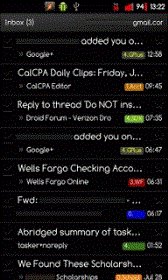
Gmail Blacked Out android apk free download

| Name | Gmail Blacked Out |
| Category | mobile, office |
| Resolution | multi |
| Type | Android 2.2 Froyo |
| Size | 1843 KB |
| Rating | 2/5 from 77 ratings |
| Rate this app: | |
| 4094 downloads | |
Description:
Ver 2.3.5, for Android
Overview: This is the latest version of Gmail blackedout
Recommended Installation
1. Back up your current version. (I use Root Explorer)
2. Uninstall Updates (Settings, Applications, Manage Applications, Select Gmail...)
3. Install apk
4. Reboot Device
You could use Root Explorer:
1. navigate to /system/app/Gmail.apk
2. Make a copy of your original.
3. Copy the new Gmail apk to /system/app/Gmail.apk (Make sure that G is capitalized).
4. Change permissions to rw-r--r-- or in permissions, 3 checks under "Read", 1 check under "Write", the rest unchecked.
5. Reboot.



 Download directly on your phone by scanning this QR code
